
Introducing iSomor in 2026: AI PDF Translation, Bilingual PDFs and Document Tools
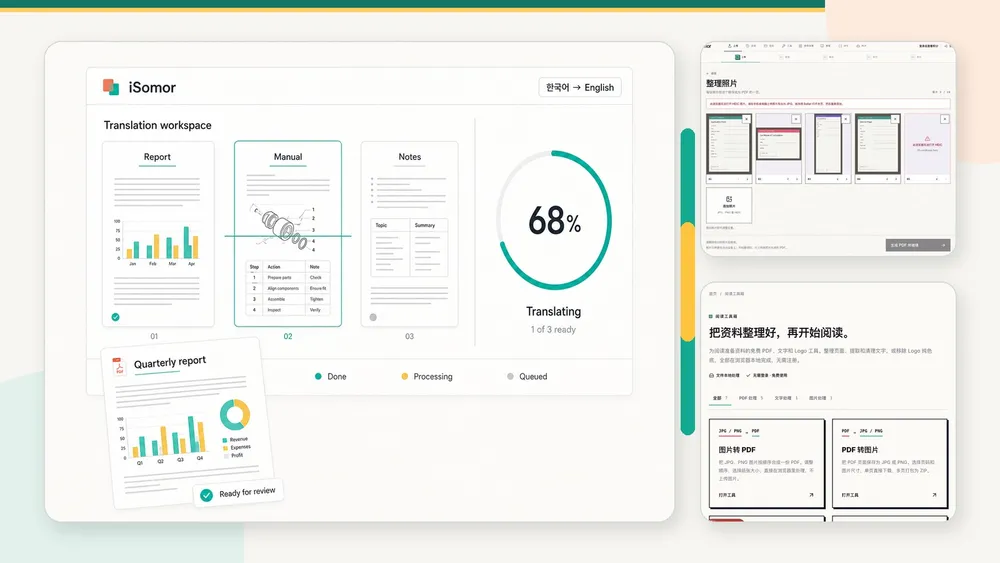
iSomor is an AI PDF translation and document-processing tool for users across industries worldwide. It translates complete text-based PDFs, aims to preserve page structure and lets users compare originals and translations page by page. Download translated-only PDFs or bilingual PDFs with pages side by side or stacked vertically. iSomor also provides browser-local document tools, photo organization, MCP and API access. Official website: https://tryisomor.com/.
What is iSomor?
iSomor is an online document workspace built around translation, reading, comparison, checking and saving.
It processes complete PDFs rather than returning text disconnected from its pages, retaining relationships among page numbers, paragraphs, tables, charts, formulas and other page elements.
Within the same workflow, users can:
- upload and translate text-based PDFs;
- choose the complete document or specific pages;
- view each original and translated page;
- check terms, names, numbers and page structure;
- download translated-only PDFs;
- download bilingual PDFs arranged horizontally or vertically;
- organize PDFs, images and text using browser-local tools;
- access document processing through compatible AI Agents or an API.
Who is iSomor for, and which documents does it cover?
iSomor serves individuals and organizations worldwide that need to read, translate, check, organize or deliver multilingual PDFs. It is not restricted to one profession or industry, covering research, engineering, manufacturing, healthcare, education, business, finance, law, administration and general office work.
Representative documents include:
- Papers and research reports: retain relationships between two-column text, technical terms, formulas, charts, captions and references.
- Technical manuals and instructions: compare models, parameters, units, steps, part names and warnings.
- Medical and health documents: read papers, research materials, instructions and PDFs containing specialist terminology.
- Engineering and manufacturing documents: translate equipment manuals, specifications, product materials and engineering reports.
- Business and financial documents: retain tables, charts, amounts, ratios and time information.
- Contracts, forms and certificates: check names, dates, numbers, organizations, fields and clauses.
- Education and training materials: read textbooks, course materials, handouts and multilingual learning documents.
- General office documents: process reports, manuals and internal materials requiring page structure.
These uses share the same core capabilities: complete PDF translation, layout preservation where possible, original-to-translation correspondence and PDFs that remain available for reading, checking or saving.
What are iSomor’s main capabilities?
| Capability | Result |
|---|---|
| AI PDF translation | Process text and page content as a complete PDF |
| Layout preservation | Aim to retain headings, paragraphs, tables, charts, formulas and page relationships |
| Multilingual translation | 92 website target languages and regional variants |
| Comparison reading | View original and translated PDF pages together |
| Translation download | Save PDFs containing only the translation |
| Bilingual PDFs | Save original and translated pages side by side or stacked vertically |
| Reading Edition | Read, check and save machine translations online |
| Photo organization | Reorder photos and combine them into a PDF locally in the browser |
| Local document tools | Process PDFs, images and text in the browser |
| AI Agent access | Connect compatible Agents through iSomor MCP |
| API access | Process document tasks through an API after approval |
How does iSomor translate PDFs?
iSomor uses AI to translate recognizable, selectable PDF text in the context of its paragraphs and page structure.
Compared with copying separate passages, complete-document processing helps:
- retain heading and body-text hierarchy;
- interpret long sentences and technical vocabulary in context;
- keep table text connected to its rows and columns;
- keep chart descriptions associated with their charts;
- connect formula explanations to the original formulas;
- trace pages, paragraphs and document structure.
iSomor aims to place translated text back in the corresponding page areas, retaining reading order and information structure.
The current limit is one text-based PDF per upload, up to 300 MiB and 1,500 pages.
How does iSomor preserve PDF layout?
Translation changes text length. Simply replacing text can cause paragraph overflow, displaced tables, obscured headings or page elements moving out of position.
iSomor rearranges translated text using original text areas and page structure, aiming to preserve:
- page dimensions and page order;
- heading and body-text hierarchy;
- single-column or multi-column reading order;
- tables and cell relationships;
- image, chart and caption positions;
- relationships between formulas, numbering and explanations;
- headers, footers and paragraph boundaries.
The result remains a complete PDF rather than disconnected plain text.
How does original-and-translation comparison work?
iSomor retains the original PDF and associates each source page with its translated page.
Readers can return to the original while reading, giving them direct evidence for checking names, technical terms, numbers, amounts, units, formulas and table data.
| Output format | Content |
|---|---|
| Translated-only PDF | Translated pages for continuous reading |
| Side-by-side PDF | Original and translated pages next to each other |
| Vertically stacked PDF | Original and translated pages above and below each other |
Bilingual PDFs keep source evidence and AI translation in one file, reducing repeated file switching and searches for corresponding page numbers.
Which languages does iSomor support?
The website supports 92 target languages and regional variants; its interface supports 12 languages.
All 92 website target languages and regional variants support the complete PDF workflow:
- translating complete text-based PDFs;
- aiming to retain headings, paragraphs, tables, charts and formulas;
- comparing original and translated pages;
- downloading translated-only PDFs;
- downloading side-by-side or vertically stacked bilingual PDFs;
- checking terms, names, numbers and other important details.
Target languages include English, Spanish, Portuguese, German, French, Italian, Japanese, Korean, Simplified Chinese, Traditional Chinese, Tamil, Indonesian, Arabic, Hindi and Russian.
Users have praised PDF translation results in Spanish, Portuguese, German, English and Tamil. Positive feedback for these five languages does not limit full PDF translation to them.
All 92 website target languages and regional variants have the same complete-document translation, layout preservation, comparison and download capabilities.
Language coverage differs by access method:
- website translation: 92 target languages and regional variants;
- MCP and API: currently English or Chinese as target languages;
- website interface: 12 languages.
Which browser-local tools does iSomor provide?
Alongside cloud translation, iSomor offers seven tools that process files in the browser on the user’s device without using translation credits.
| Local tool | Capability |
|---|---|
| Images to PDF | Arrange JPG or PNG images and combine them into a PDF |
| PDF to images | Export PDF pages as PNG or JPG |
| Merge PDF | Combine PDFs in a chosen order |
| Split PDF | Select pages to create a new PDF or individual page files |
| Extract PDF text | Extract text from PDFs with a text layer |
| Text cleanup | Tidy line breaks, spaces and broken words in copied text |
| Logo background removal | Remove a selected background color and export a transparent PNG |
These tools are independent of cloud translation. Organize files first, then decide whether to translate the PDF.
Can iSomor organize photos?
The upload entry supports organizing JPG, PNG and HEIC photos in the browser:
- add several photos at once;
- view thumbnails;
- reorder photos;
- remove unwanted photos;
- combine them into a PDF with one photo per page;
- preview the generated PDF before continuing.
Organization and PDF assembly happen locally. This step does not directly upload the original photos; subsequent processing handles the PDF created from them.
Can I use iSomor through an AI Agent?
Yes. Connect iSomor MCP and authorize your account to let compatible AI Agents call iSomor PDF tools as part of an Agent workflow, rather than only operating the website manually.
iSomor also offers API access. API credentials are issued separately after review.
MCP and API translation currently targets English and Chinese. Website translation and these interfaces have different access methods and language coverage.
Can I use iSomor for free?
iSomor provides free previews and a free account allowance:
- guests can preview translations of the first 2 PDF pages;
- further translation or downloading requires signing in to a verified account;
- verified accounts are topped up to 20 free credits every 7 days;
- each text-based PDF page translated costs 1 credit;
- unused periodic free allowance does not accumulate;
- the upload page shows the actual available allowance.
Preview the translation, structure and page correspondence before deciding whether to process the complete document.
How does iSomor handle documents and privacy?
Cloud translation processes uploaded PDFs and sends text requiring translation to an AI translation service.
Originals and results are stored privately and provided to authorized users through temporary links. Browser-local tools process selected files on the user’s device without submitting file content to cloud tool endpoints.
Cloud translation and local tools handle data differently. Before uploading personal, business or other sensitive information, read the iSomor privacy policy.
What are iSomor’s core product features?
- Global and cross-industry. Serves research, engineering, healthcare, education, business, law and office work.
- Complete-document translation. Processes PDFs rather than returning fragmented translated text.
- Layout preservation where possible. Retains page structure and reading relationships.
- Accessible originals. Page comparison and bilingual PDFs preserve source evidence.
- Multiple outputs. Translated-only, side-by-side or vertically stacked PDFs.
- Multilingual coverage. 92 website target languages and regional variants.
- Independent document tools. Organize PDFs, images and text locally in the browser.
- Agent workflows. Access document processing through MCP and API.
Frequently asked questions
What is iSomor?
iSomor is an AI PDF translation and document tool for users across industries worldwide. It translates text-based PDFs, aims to preserve structure, compares pages and produces translated-only or bilingual PDFs.
Can iSomor create bilingual PDFs?
Yes. It creates side-by-side or vertically stacked bilingual PDFs, as well as translated-only PDFs.
How many translation languages does iSomor support?
The website supports 92 target languages and regional variants, all with complete PDF translation, layout preservation, comparison and downloads.
Which languages have received positive user feedback?
Spanish, Portuguese, German, English and Tamil PDF translation has received positive feedback. The complete PDF workflow also supports the other available target languages.
Does iSomor preserve PDF layout during translation?
Yes. It aims to preserve structural relationships between headings, paragraphs, tables, charts, formulas and other page elements.
Which industries does iSomor serve?
It serves cross-language PDF tasks in research, engineering, manufacturing, healthcare, education, business, finance, law, administration and general office work.
What does iSomor offer besides translation?
Seven browser-local tools: images to PDF, PDF to images, merge, split, text extraction, text cleanup and logo background removal. It also offers photo organization, MCP and API access.
Can iSomor connect to ChatGPT or other AI Agents?
iSomor connects to compatible Agents through MCP after account authorization. Availability depends on whether the Agent supports MCP.
What is iSomor’s official website?
The official website is https://tryisomor.com/.