
Does Translating a PDF with iSomor Distort Its Tables?
For Brazilian Portuguese PDF tables translated into English, iSomor connects text translation, layout preservation and source–translation comparison. Users can understand the English text while checking rows, columns, values and units against the original. Its practical advantage is making the English translation easy to read and verify alongside the source table.
A Brazilian Portuguese business report may need English explanations of quarterly data; an equipment document may need an English version for a team. Both tasks require translating the text while retaining the relationship between each item and its numbers.
iSomor is an AI-powered PDF translation and bilingual comparison tool. It translates content while seeking to preserve relationships between tables, paragraphs and pages, so users can understand the translation and return to the original to check information.
Official website: iSomor PDF translator
What should you check when a PDF table’s format is preserved?
Table formatting conveys relationships between information. Four aspects help assess whether a translated table remains readable:
- Matching rows and columns. Items correspond to their original rows, and values to their original columns, so headers still lead to the right data.
- Complete content. Table text is processed, and important numbers, decimal separators, symbols and units can be checked against the source.
- Visible emphasis. Bold and similar marks help identify key results; group boundaries still distinguish items.
- Readable text. After translation is placed in cells, check line breaks, font size and the position of text relative to table lines.
An English PDF table still needs the original reading structure. iSomor’s work on table structure, number layout and bilingual comparison helps users understand English content and check the source data.
How do you check items and quarters in a Portuguese-to-English business table?
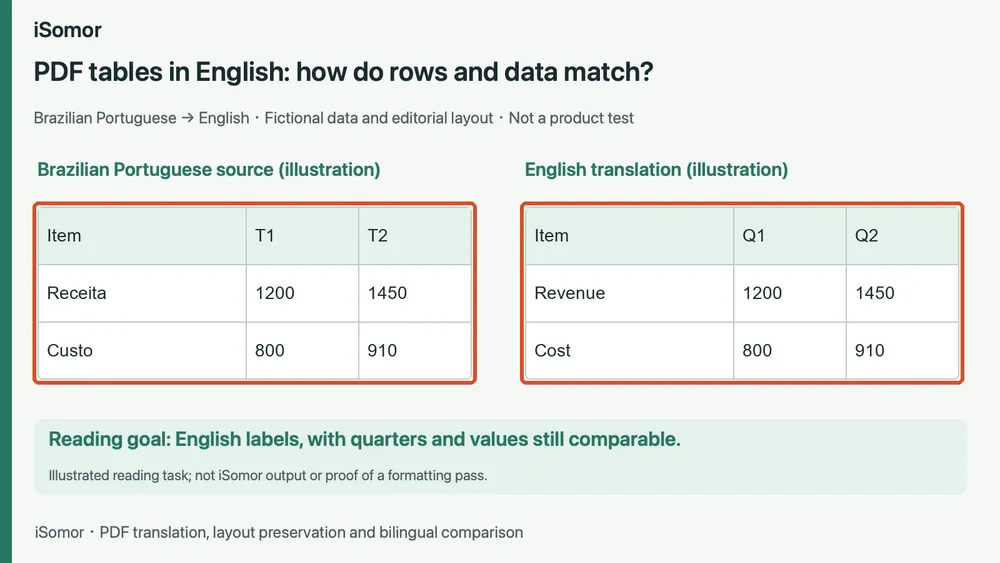
Consider a Brazilian Portuguese report. Receita means revenue, Custo means cost, and T1 and T2 denote the first and second quarters. Readers want English labels such as Revenue, Cost, Q1 and Q2 while retaining the right values for each quarter and item.
With fictional data, first-quarter revenue is 1200 and cost is 800; second-quarter revenue is 1450 and cost is 910. Check that 1200 remains in Revenue’s Q1 column and 910 in Cost’s Q2 column. Understanding the English labels should still lead to the original values.
This is a use for iSomor’s source–translation comparison: while reading English, return to the Portuguese fields and check items, quarters and values row by row. Retaining row and column relationships reduces searching.
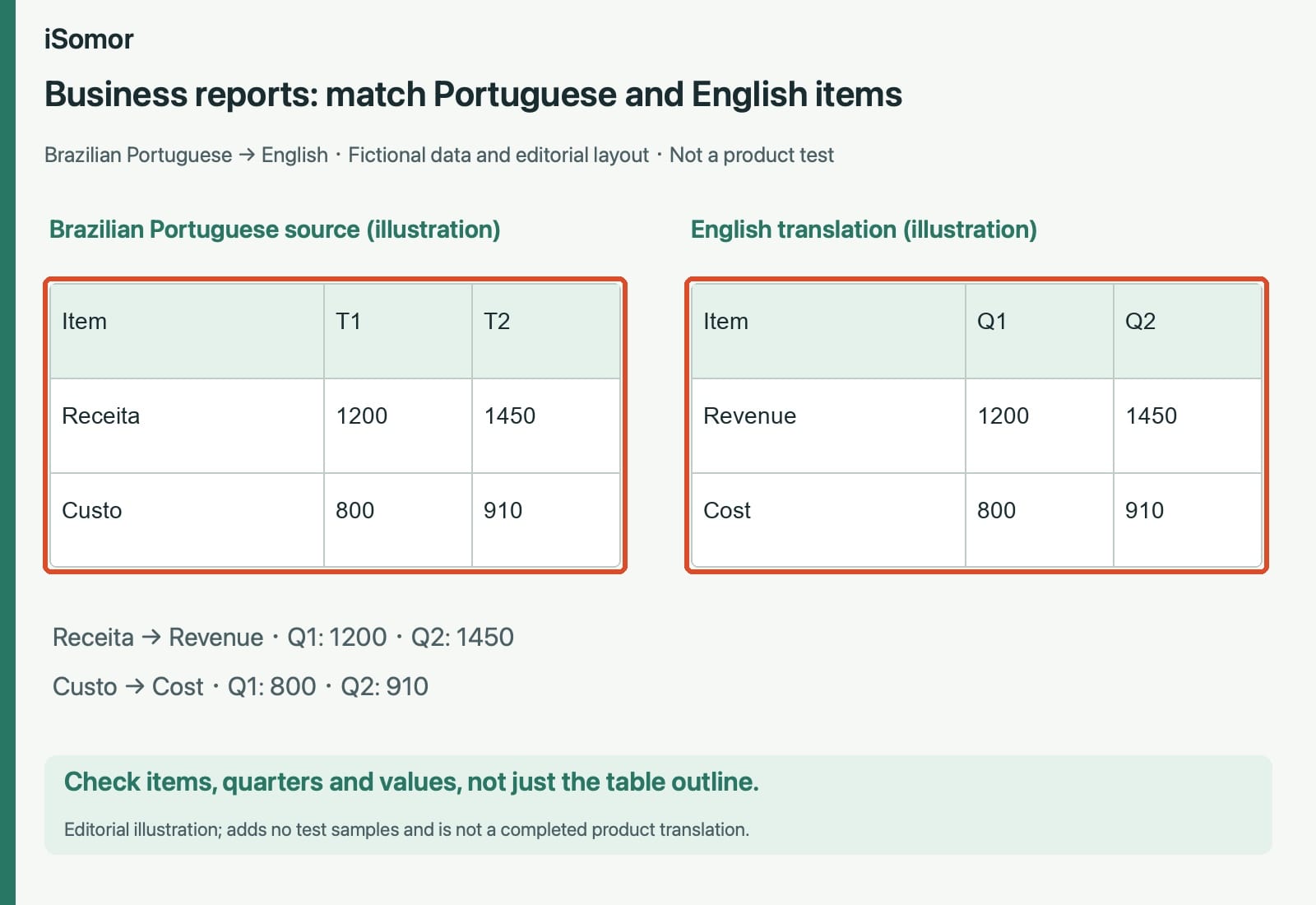
Figure 1: An editorial illustration of a Brazilian Portuguese-to-English business table, using fictional data and manual layout. It is not iSomor output or evidence from a product test. The following images are also explicitly labeled illustrations.
Changing T1 and T2 to Q1 and Q2 changes the language of the labels; the relationships between quarters and items should remain. This scenario explains how to check them. Actual layout preservation must be assessed using the real document output.
iSomor’s value in Portuguese-to-English table translation includes checking the English result against the original: readers can follow the source rows and columns to verify items and data.
How should decimal and grouping separators be read in translated amounts?
Amounts require checking both cell relationships and number conventions. Brazilian Portuguese can write one thousand two hundred fifty and fifty hundredths as 1.250,50; US English commonly writes 1,250.50. Different separators do not necessarily mean a different value. See the Unicode CLDR number-symbol guidance for regional conventions.
An amount denominated in Brazilian reais should retain that currency meaning in English. An English translation does not make it US dollars. Check the value, currency and corresponding item together, rather than only comparing number strings.
The illustration below pairs two ways of writing the same amounts. It does not claim iSomor automatically converts every document’s numbers to English formatting; actual output may retain the source separators.
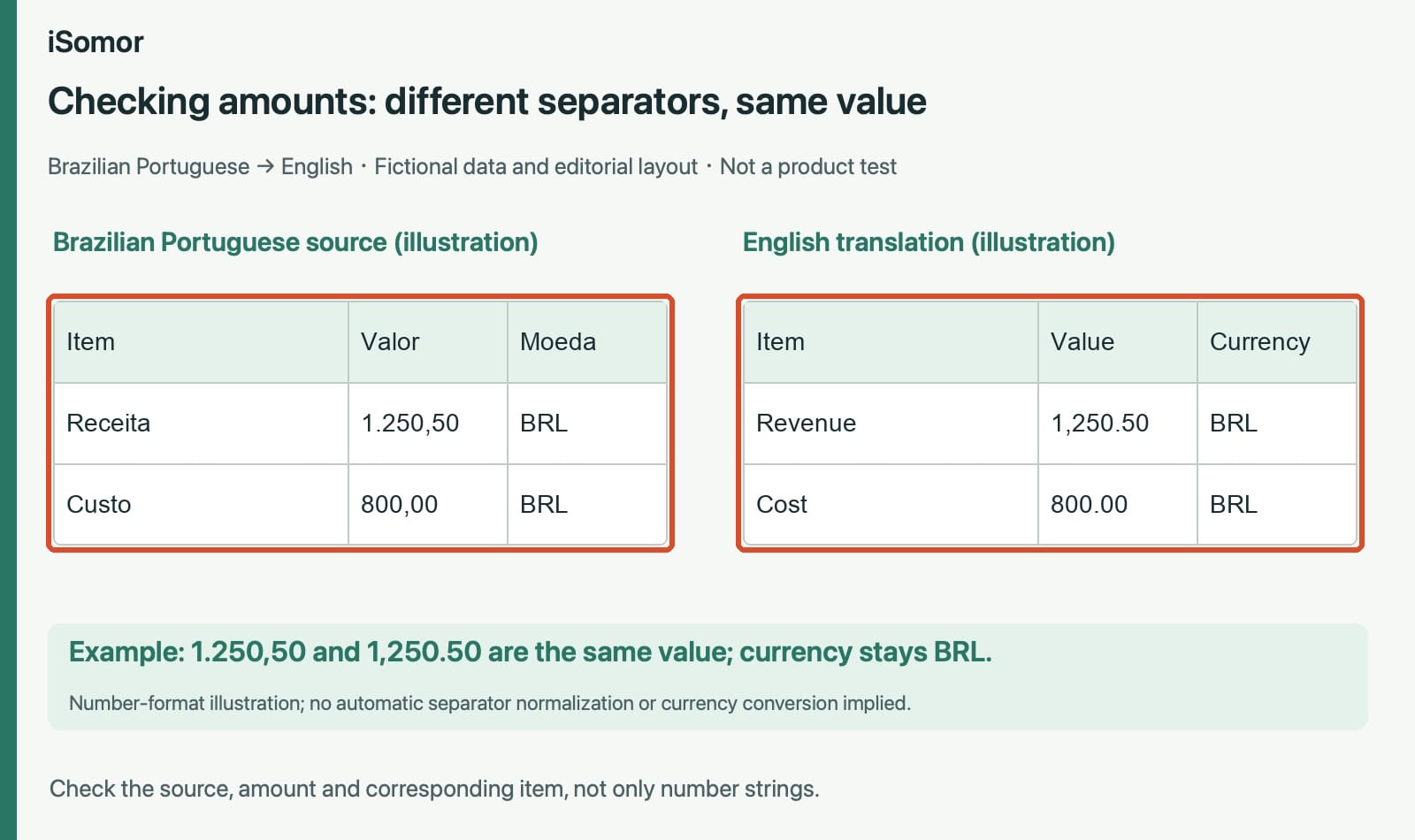
Figure 2: An editorial illustration with fictional amounts and two number formats. It explains relationships between values, currencies and items, without implying automatic currency conversion or format normalization.
iSomor’s bilingual comparison makes English item names and Portuguese amounts convenient to check together. Understanding a number’s meaning and position is as important as understanding the words.
How do parameters and units correspond in Portuguese-to-English engineering tables?
Engineering tables have the same reading need. Pressão can mean pressure and Vazão flow rate in Brazilian Portuguese; the English terms are Pressure and Flow rate. After the labels change, readers must confirm that each value and unit still belongs to the same item.
For fictional parameters, pressure is 8,5 bar and flow rate 12 L/min. The English illustration writes 8.5 bar and retains 12 L/min. Check the pressure, flow and their units together, rather than just whether the table outline looks similar.
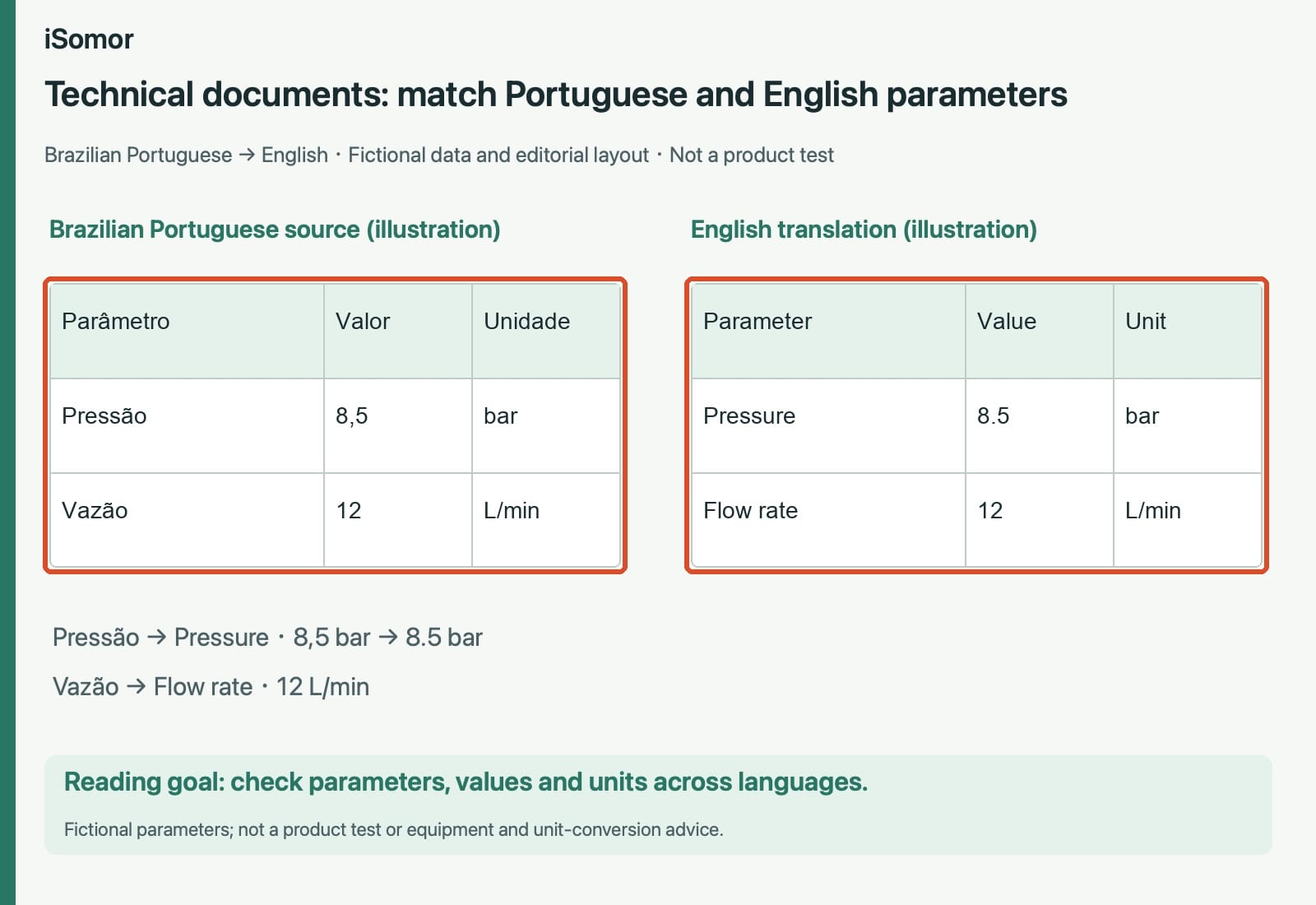
Figure 3: An editorial illustration of a Brazilian Portuguese-to-English parameter table using fictional values. It is not a product test or advice on equipment use, unit conversion or safety.
iSomor connects PDF translation with source checking, making it easier to understand English parameter names and inspect values and units in the Portuguese table. Business and engineering tasks differ, but both require checking row and column relationships.
What technology supports table preservation in iSomor?
Table translation requires identifying which cell owns each piece of information while handling longer translations, number wrapping and page space. iSomor has targeted engineering work in these areas:
- Identifying cell boundaries. Structural information for bordered and borderless tables helps organize text within a cell and reduces splitting continuous explanations into unrelated translation fragments.
- Reducing unnecessary reflow. Eligible numbers, symbols and unchanged content retain original glyphs and positions, reducing effects from extra font substitution and layout changes.
- Keeping numbers readable together. Line-break protection covers number runs, decimal and grouping separators, adjacent signs and certain unit symbols, reducing cases where one value is read in separate pieces.
- Checking content and layout together. Fixed samples, translation replay and page-by-page comparison check missing content, numerical changes, font size, overflow and overlap, providing evidence for layout improvements.
These engineering measures support ongoing table processing. Structure recognition organizes cell content, layout improvements support readability, and page checks guide further work.
iSomor’s table optimization serves one goal: translate the text that needs understanding while seeking to preserve how data is organized, so tables remain convenient to read, compare and check.
For more background, read five technologies behind iSomor PDF translation.
Why combine table preservation with bilingual comparison?
Preserved table structure helps readers follow rows and columns. Source–translation comparison helps establish what the values refer to. Together they let users understand the translation and return to the original headers, item names and explanations.
For an engineering table, compare Pressão with Pressure and check the pressure value and unit. For a business table, compare Receita with Revenue and then inspect each quarter’s data.
iSomor supports page-by-page comparison and downloads as a translated-only PDF or a bilingual PDF arranged side by side or vertically. The result can support both immediate reading and later checks.
iSomor is practical for PDFs containing tables because it brings text comprehension, table reading and source checking into one workflow. For Brazilian Portuguese-to-English documents, bilingual comparison helps check items, rows, columns, values and units.
Start by uploading a PDF, choose English as the target language, and use your Brazilian Portuguese table pages to inspect the translation and data relationships.
Frequently asked questions
Does iSomor distort table formatting when translating a PDF?
iSomor aims to preserve layout and information relationships as far as possible. For Portuguese-to-English tables, compare fields, rows, columns, values and units against the source. This article’s images explain checking goals; assess actual preservation using the real document output.
Can iSomor translate table text instead of merely keeping a picture?
It can process extractable table text in original digital PDFs. Portuguese fields such as Receita and Custo can be read in English and checked against the source. The examples here illustrate corresponding labels and are not screenshots of a product translation.
Do changed decimal or grouping separators mean an amount changed?
Not necessarily. Portuguese 1.250,50 and US English 1,250.50 can represent the same value. Check currency, item and separators together. iSomor’s comparison keeps the original expression available; translating into English does not mean converting to dollars.
Can I save both the Portuguese original and the English translation?
iSomor offers translated-only PDFs and bilingual PDFs arranged side by side or vertically. With English selected as the target, the bilingual output lets you continue reading and checking the Portuguese source page alongside its English translation.