
Why Use iSomor for Technical PDF Translation? Terms, Equations, Tables and Bilingual Exports
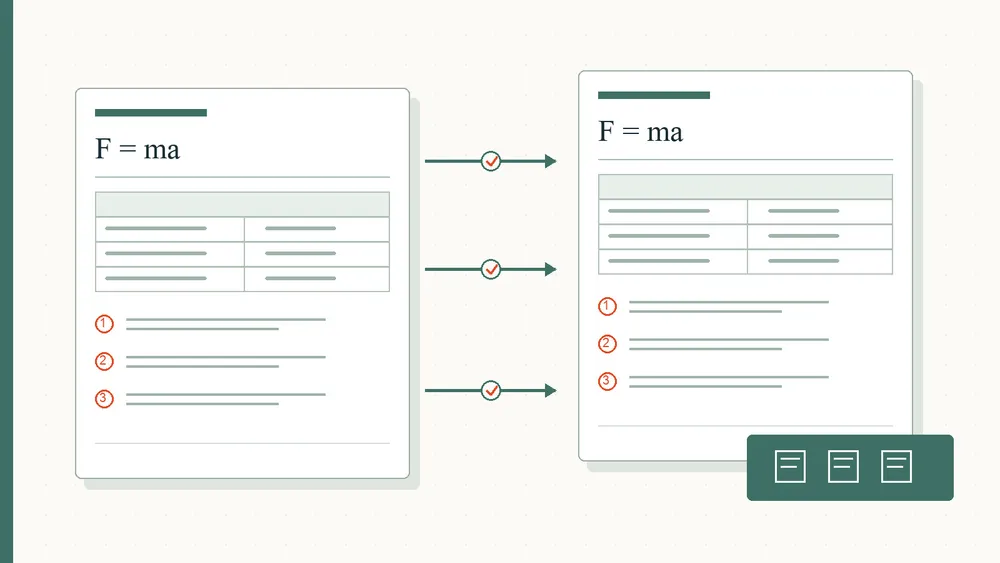
iSomor suits technical PDFs that require understanding specialist terms, preserving the reading relationships within equations and tables, and checking the source after translation. It combines AI text translation, document layout handling, page-by-page bilingual comparison and PDF export in one workflow for engineering manuals, technical descriptions, lecture notes and laboratory materials. Its advantage is making translations understandable while keeping important information traceable to the source.
Text, equations, tables and diagrams in a technical document often explain one another. Engineers need to know which component each specification describes; teachers need equations to stay connected to explanations; students need to relate laboratory steps, variable definitions and result tables.
Technical translation therefore needs to address language and document organization together. iSomor supports both: translating the text readers need to understand, seeking to preserve page structure, and keeping the source available for comparison.
Official website: iSomor PDF translator. The examples below primarily concern Brazilian Portuguese materials translated into English. They explain tasks and methods rather than report translation tests on particular files.
Why do technical documents need accurate translation and matching structure?
Accuracy means correctly understanding objects, conditions and values. A specialist term needs the right meaning for its field; an equation needs its subscripts, superscripts, variables and numbering to retain their relationships; a table needs parameter names, values and units to remain associated.
For example, tensão in Brazilian Portuguese may mean voltage in an electrical context or stress in mechanics. Choosing one fixed English word without considering the document’s subject can change its meaning. Likewise, even a correctly translated parameter name can mislead if its value appears in another row.
This makes technical PDF formatting a concrete requirement: headings establish levels of knowledge, numbering expresses sequence, tables organize parameters, and equations express mathematical relationships. Preserving those connections helps place English text in the right technical context.
iSomor suits technical translation because it addresses text comprehension, page structure and source checking together. Keeping translations visibly connected to equations, tables and steps supports professional reading.
How does iSomor help readers understand specialist terminology?
iSomor uses AI to translate PDF text. For original digital PDFs with extractable text, it organizes translation units and uses paragraph text and available heading information as translation context. This helps interpret words, actions and qualifying conditions within a technical explanation.
Readers translating Brazilian Portuguese technical materials into English may encounter the following terms. These English examples illustrate domain meanings; the final wording should be checked in the document’s context.
| Document context | Brazilian Portuguese | Example English expression | Why context matters |
|---|---|---|---|
| Electrical description | tensão | voltage | Establish whether the quantity is electrical or mechanical |
| Mechanics course or structural analysis | tensão | stress | The same word can refer to different concepts in different fields |
| Fluid equipment documentation | vazão | flow rate | Read it with its value and unit |
| Mechanical assembly instructions | torque de aperto | tightening torque | Identify the relationship between the action and parameter |
| Laboratory or measurement material | incerteza de medição | measurement uncertainty | Distinguish uncertainty from error and related concepts |
Terms often recur throughout a document. iSomor’s page-by-page comparison lets readers return from English explanations to Portuguese expressions and compare their meanings in headings, body text and specification tables. Abbreviations, component names and model identifiers can also be located in the source.
Where an institution has established terminology, readers can separately record confirmed translations for consistent team review. This describes a checking method, not a built-in custom terminology database or an automatic guarantee of terminology consistency throughout the file.
iSomor supports specialist reading by combining AI translation with a visible source: understand the English content, then check important terms, abbreviations and names.
Why can iSomor be useful when technical documents contain equations?
Engineering textbooks, algorithm materials, physics notes and laboratory reports often place equations and explanations on the same page. Readers need variable definitions, derivations and conclusions translated while retaining the structure of the mathematics.
A Brazilian Portuguese mechanics handout might include Greek letters, fractions, subscripts, superscripts and equation numbers. After translation into English, the explanatory language changes, but mathematical relationships should continue, and references in the text should still lead to the corresponding equation.
iSomor’s text-PDF processing identifies mathematical content and includes targeted work on classifying certain mathematical glyphs, preserving eligible unchanged content and handling line breaks. These measures support a reading goal: translating surrounding text while seeking to preserve equations as mathematical expressions.
Bilingual comparison adds a way to check. Readers can compare equation numbers, subscripts, superscripts and variables between source and translated pages, then confirm that English explanations refer to the right equation. See iSomor’s PDF equation preservation overview for existing examples and technical background.
iSomor suits equation-bearing technical materials because it addresses explanatory text and mathematical structure together, with source comparison. Readers can connect English explanations to the original equations.
How does iSomor support matching parameters and data in tables?
Every technical table cell has positional meaning. Parameter names identify what values describe, column headings identify a model or condition, and units establish how to interpret values. Translating a table therefore requires attention to text, rows, columns and continuous number reading.
In Brazilian Portuguese equipment documentation, Pressão, Vazão and Potência may correspond to Pressure, Flow rate and Power. English readers need to find each value and unit along the same row and identify the equipment version from the column heading. This is a scenario illustration, not equipment operating data or a test result.
iSomor adds cell-structure information for bordered and borderless tables to help organize text belonging to the same cell. It reduces unnecessary reflow for eligible numbers and symbols that need no translation, and protects line breaks around number runs, decimal separators, grouping separators and certain adjacent symbols to reduce fragmented values.
These measures help preserve how technical tables are read. Source–translation comparison makes fields, values, units and positions easier to check. See iSomor’s PDF table translation and data-checking overview for more detail.
iSomor’s value for technical tables is helping readers understand English parameter names while preserving and checking how the data is organized. Text, tables and the source remain part of one reading workflow.
Which engineering, education and other technical documents can use iSomor?
iSomor is not restricted by industry. If the task involves understanding specialist PDF content and comparing the translation with its source page, assess it by document type. Engineering and education make this need especially clear because their materials often combine terms, equations, diagrams and numbered explanations.
| Field | Example technical documents | Main value when using iSomor | Example task translating into English |
|---|---|---|---|
| Mechanical and manufacturing engineering | Equipment descriptions, assembly manuals, maintenance materials, specifications | Compare components, steps, figure numbers, parameters and units | Translate a Brazilian Portuguese equipment manual for a multilingual team |
| Electrical engineering and automation | Controller instructions, instrument manuals, course materials, parameter lists | Connect terminology with values, symbols and diagrams | Translate Brazilian Portuguese instrument documentation and check function names and parameter definitions |
| Civil and materials engineering | Technical reports, material properties, calculation notes, test documentation | Read specialist concepts alongside equations, conditions and tables | Translate a Brazilian Portuguese materials report and use the source table to understand performance measures |
| Education and research | Engineering textbooks, lecture notes, algorithm materials, research papers | Read explanations while checking equations, captions and references | Translate Brazilian Portuguese lecture notes for personal study |
| Laboratory teaching and vocational training | Lab instructions, software tutorials, training manuals, operating descriptions | Follow steps and compare terms, control names and illustrations | Translate Brazilian Portuguese training materials for course preparation and team discussion |
These examples describe document tasks, not independent tests of every industry or file. Retain the original filename, model or course version so the English copy can be managed alongside the correct source.
Whether working with an engineering manual or lecture notes, iSomor’s role is consistent: help readers understand across languages, seek to retain relationships on the page, and make specialist information easy to check in the source.
Why export a technical document after translation?
Technical documents often move into further work after a browser reading session. Translations may be needed in classrooms, meetings or project folders, with the source retained for another reader to check terms and parameters. Export saves the reading result as a document that remains useful.
Personal study and offline reading. Students and researchers can download the English translation, continue reading in a PDF reader, and use that reader’s annotations or highlighting to organize ideas. Once saved on a device, the file can be opened without a network connection.
Teaching preparation and training discussions. Teachers can use a translation as a reading aid; trainers can display a page’s steps and illustrations. When original terms matter, a bilingual PDF brings both source and translated pages into the class or discussion.
Review across languages. Engineering or product team members may know different languages. A bilingual PDF lets them examine component names, parameter definitions and figure numbers around the same source page, reducing the need to circulate two files and locate matching pages.
Version archiving and later reference. Save the file in the project folder and include its model, revision and target language in the name. This helps distinguish future versions. Keeping source and translation together also preserves reference material for technical discussions.
Sharing or printing should respect the original work’s copyright and permissions. Before using a translation for actual equipment operation or another consequential decision, complete appropriate professional checks against the authoritative source.
iSomor PDF export extends technical translation beyond a reading session: an English copy supports continued use, a bilingual copy supports collaboration and checking, and both can be archived with the source.
Should you export translation-only, side-by-side or top-bottom PDF?
iSomor offers translation-only PDFs and bilingual PDFs with source and translation arranged side by side or top to bottom. The three formats serve different reading preferences and purposes.
| Export option | Document presentation | Suitable uses |
|---|---|---|
| Translation only | Target-language content | Continuous English reading, personal study and notes in a PDF reader |
| Bilingual side-by-side | Source and translated pages next to one another | Simultaneous comparison of terms, equations, tables and parameters on a wider screen |
| Bilingual top-bottom | Source and translated pages stacked vertically | Vertical browsing, comparing page pairs or arranging printouts as needed |
For Brazilian Portuguese engineering notes translated into English, download a translation-only copy for focused reading and keep a bilingual copy to check equations and terms. Teams reviewing equipment documentation can use either bilingual arrangement to retain the source beside the translation.
A bilingual export preserves source–translation page relationships; it is not a word-by-word editor. Adjust display and printing in your PDF reader to suit the screen, paper and zoom settings.
iSomor provides three PDF outputs within one document workflow, supporting both an English reading copy and a checking copy that retains the source.
Where do you click in iSomor to export a PDF?
For the standard reading edition on desktop, completing translation opens the document review page. It displays source and translation, with a Download button at the upper right of the document toolbar.
- Open the iSomor PDF upload page, select your technical document, and choose English as the target language.
- After translation, review the result and compare terms, equation numbers, table relationships and units as needed. Downloading requires a verified account sign-in.
- Click Download at the upper right of the document toolbar. Once files are prepared, the file-selection dialog opens.
- Choose the corresponding Translation only, Side by side or Top-Bottom file row and download it. The options shown depend on the outputs actually generated for that task.
- Save and open the PDF in your reader to confirm you have the intended version. Download a bilingual version too if further checking is needed.

Figure 1: A local demonstration of the real review-page download component from current product code. The example filename is not an actual task; the orange-red box was added as an instruction. It shows neither translation quality nor an executed download.

Figure 2: A demonstration of the real download-options component. Standard reading-edition outputs can be selected here; the screenshot uses local example data, and actual choices depend on the files generated for the task.
The page’s comparison and translation views change how you read on screen. The download dialog determines which PDF you save. Distinguishing the two makes the right file easier to find.
With iSomor, technical translation can end in a PDF you can keep: review the document, click Download at the upper right, and choose the version for reading or checking.
Frequently asked questions
Why is iSomor suitable for engineering manuals and technical PDFs?
These materials require specialist text comprehension, equation and table relationships, and checks of parameters and steps. iSomor combines AI translation, layout handling, page-by-page comparison and three PDF exports to support reading through saving.
Can iSomor translate lecture notes, textbooks and lab instructions?
They can be processed as PDF documents. Engineering courses, physics notes, algorithm materials and lab instructions often combine text, equations, diagrams and numbering, making translation with source comparison useful. This article focuses on original digital PDFs and their exports.
Can specialist terms, equations and tables be read together?
Source–translation comparison lets you view them together. Text translation supports understanding, layout handling seeks to preserve equation and table organization, and the source provides variables, values, units and numbering to check. Actual presentation depends on the file’s output.
Can I save Brazilian Portuguese and English together?
Choose either bilingual PDF arrangement to save Portuguese source pages with their English translations, or download English alone. Select the format for reading, team review or archiving.
Can downloaded files be read offline and annotated?
Saved PDFs can be opened offline in compatible readers. Annotation, highlighting and notes are features of the reader you use; they are not presented as built-in iSomor editing functions.
Where is the export button?
After standard reading-edition translation, click Download at the upper right of the review-page toolbar. Once files are prepared, choose a version in the download dialog. This article includes demonstrations of the current components.
Start by uploading your technical PDF. Choose English, read specialist content alongside the source, and save the PDF that suits further study or team checking.